
RAVE MACHINE
Revolutionizing
THE EDM Festivals EXPERIENCE
introduction
Why Rave Machine?
Hey there, this is the default text for a new paragraph. Feel free to edit this paragraph by clicking on the yellow edit icon. After you are done just click on the yellow checkmark button on the top right. Have Fun!
project metrics
Name
Key Performance Indicators (KPIs)
How can you measure progress toward the research goals?
KPIs might include: Time on task, use of navigation vs. search, user error rates, drop-off rates, conversion rates, system usability scale (SUS), etc.
Time on page, user error rates, drop-off rates, SUS
Will the KPIs I chose help me measure progress toward my research goal?
Will the KPIs I chose give me meaningful insights into user behavior?
Will the KPIs I chose give me actionable feedback about how parts of my design are performing?
second-hand research
Name
Introduction
Title: A few words about the focus of the study
One-stop rave app
Author: Your full name, job title or role, and email address on one line
Ezra Xia, UX researcher, xiaezra@gmail.com
Stakeholders: List the names of project stakeholders and their roles
Ezra Xia - Founder & UIUX, Timothy S - Founder & Sales
Date: Update the date listed every time you edit this plan
12/21/2022
Project background: What led you to conduct this research?
We are creating a rave app to improve the current rave apps on the market, make ravers life easier one rave at a time
Research goals: What design problems are you trying to solve for the user and/or the business? How will the results of the research affect your design decisions?
Make our users’ life easier
Give more insight to rave event businesses/venues/artists
Research Questions
What are the questions your research is trying to answer?
Pro tip: 5 research questions is a solid place to start. Do not include more than 7-10 research questions.
How long does it take for ravers to find lineup/their schedule/destination(on map page) during a festival/show/set?
What can we learn from what page they click into?
What can we learn from the our user’s flows?
Are there any parts where users are getting stuck?
Are all the buttons/features intuitive for our users?
Are all the features necessary?
Are we missing necessity?
Key Performance Indicators (KPIs)
How can you measure progress toward the research goals?
KPIs might include: Time on task, use of navigation vs. search, user error rates, drop-off rates, conversion rates, system usability scale (SUS), etc.
Time on page, user error rates, drop-off rates, SUS
Will the KPIs I chose help me measure progress toward my research goal?
Will the KPIs I chose give me meaningful insights into user behavior?
Will the KPIs I chose give me actionable feedback about how parts of my design are performing?
Methodology
How will you collect data? How will you analyze the data once you get it?
The methodology should be detailed so that other researchers can understand what you did, the choices you made, and the limitations of the methods employed to decide if or when further research is needed.
list title (ex. unmoderated usability study), location, date, description of the whole process, and duration.
Participants
Who will you include in this study? What characteristics do the participants have? Why did you choose them?
All kinds of ravers, festival ravers, local ravers, all genres, different demographics & sexual orientation
List the actual #s of participants & their of demographics, etc.
Note: If you’re intentionally including specific populations (e.g., users with diverse abilities and perspectives), be clear about the needs of the study.
Script / Discussion Guide
What questions will you ask study participants?
Intro:
Before we begin, do I have your consent to take both audio and video recordings of this interview?
I want you to know that this isn’t a test. There is no “right” answer, and none of your responses will be considered wrong.
If you have any questions, please don’t hesitate to ask.
This data is being collected to help improve a rave/festival app. Your answers will help us make the app easier for people to use.
Basic questions:
What kind of city or town do you live in?
How much rave events are around where you live?
How often to you check “rave schedules”?
Do you frequently travel for raves? festivals?
How often do you rave?
How many raves have you been? festivals?
How frequently do you download the apps that comes with the festivals?
How often do you use the apps before a rave/festival?
How often do you use the apps during a rave/festival?
Which features do you use the most? the least?
Prompt 1: Open up the rave app and try to make your own schedule . Do your best to talk me through your thought process.
Follow-up: What was easy and what was challenging during this process? Do you think you needed all the features it offers? Do you think it lacks something?
Prompt 2: If I said, share your festival schedule with me, would you know what to do?
Follow-up: Try it now, please
Follow-up: Did you find anything confusing?
Prompt 3: If you needed help with finding your lost phone, how would you navigate that in the app? Do you best to talk me through your process.
Follow-up: How was the process?
Follow-up: Did you find it difficult?
Was the whole process intuitive?
Are there buttons you don’t know the function of?
Would you use an app like this?
competitive audit
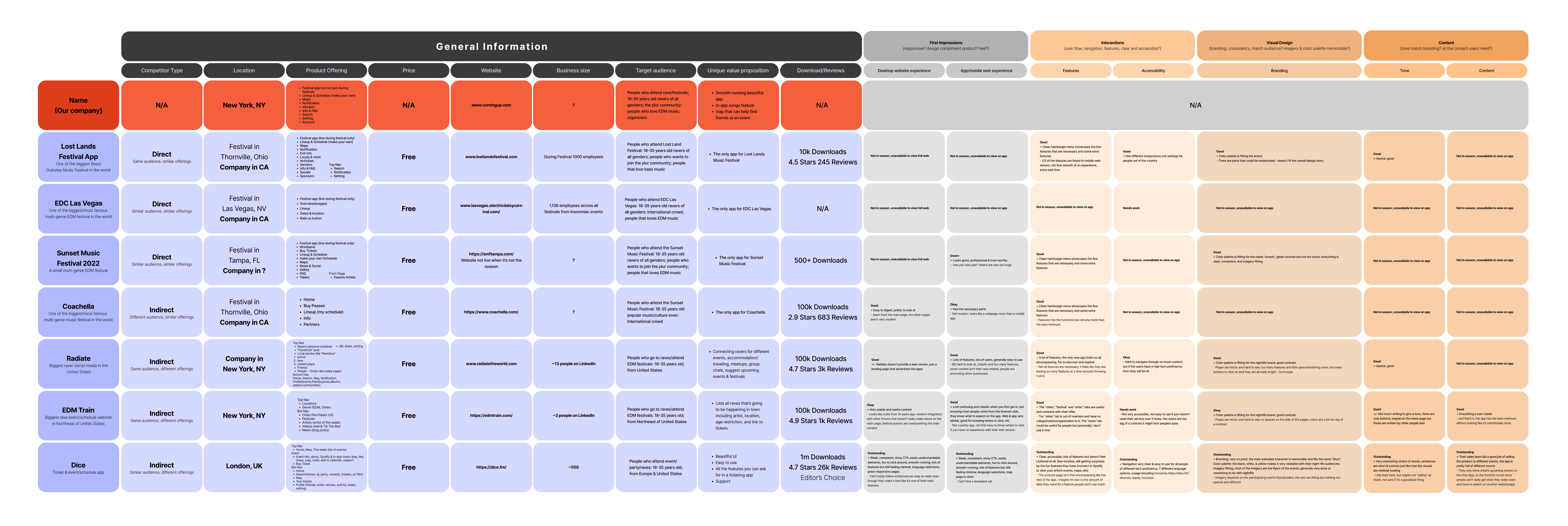
3 Types of Rave Apps
Hey there, this is the default text for a new paragraph. Feel free to edit this paragraph by clicking on the yellow edit icon. After you are done just click on the yellow checkmark button on the top right. Have Fun!
USABILITY STUDY
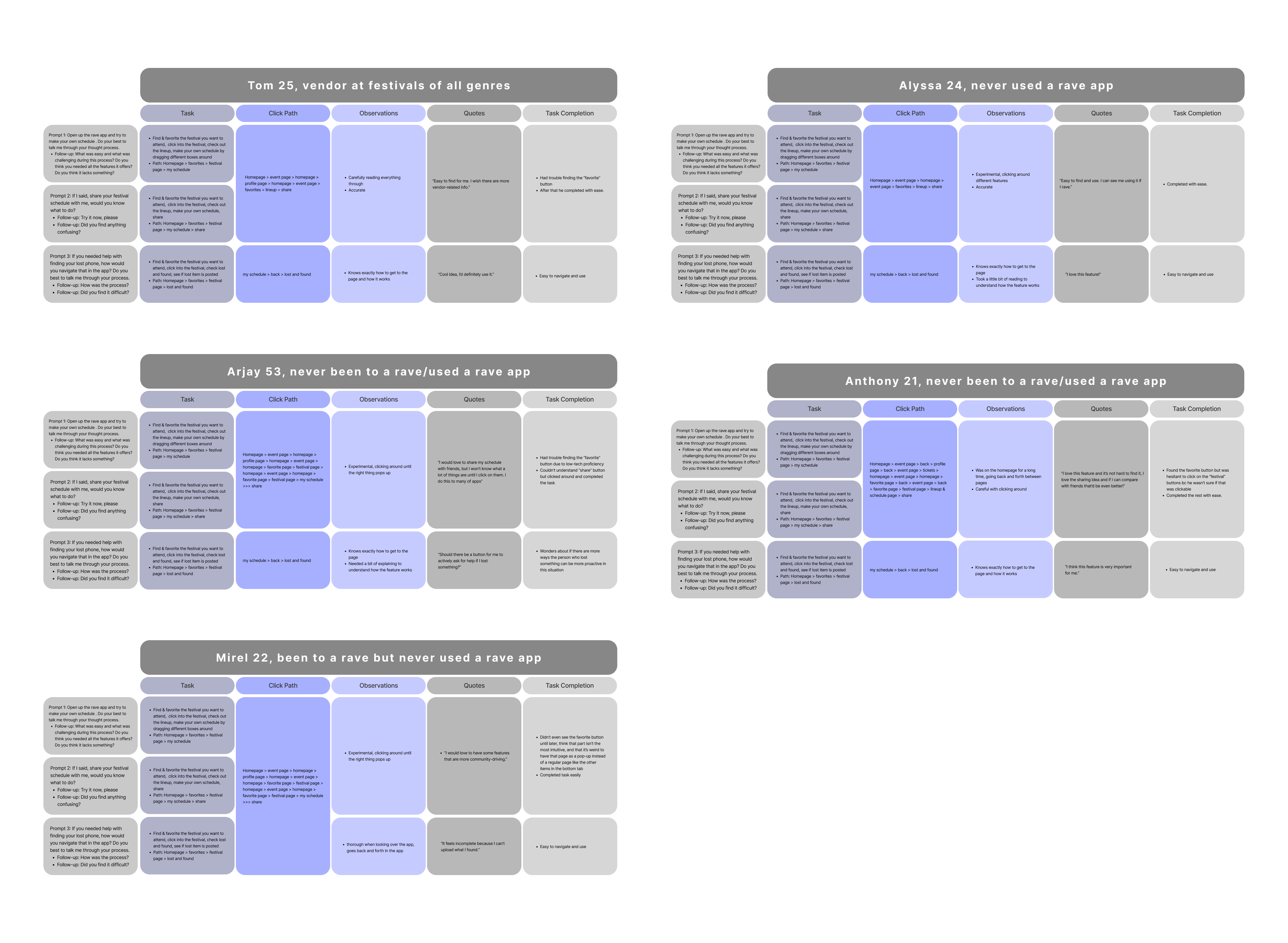
five Subjects
Including a variety of users that are frequent rave app users & brand new to rave apps; across different ethnicity and location. Subjects match the user group of Rave Machine, which are mostly in the age group of 20-29.
Insights
five major insights
1. Most users (5/5), don't find it immediately clear how to access the festival page, an insight is: users need the festival page to be under the right category in tabs / right hierarchy to find the overlay easier
2. Most users (5/5), don't find it immediately clear how to access the festival pages even when they already have the favorite overlay open, an insight is: the festival page links are not very clickable-looking.
3. Some users (3/5) share their schedule for the reason of comparison an insight is: maybe have in-app schedule comparison instead of sharing, or both.
4. Most users (4/5) love both features and the insight is: the feature is needed, we just need the users to be able to find and use them.
5. Not everyone(1/5) is familiar with the icon “share” an insight is: test more “share” buttons to see if there are better options for the “share” button
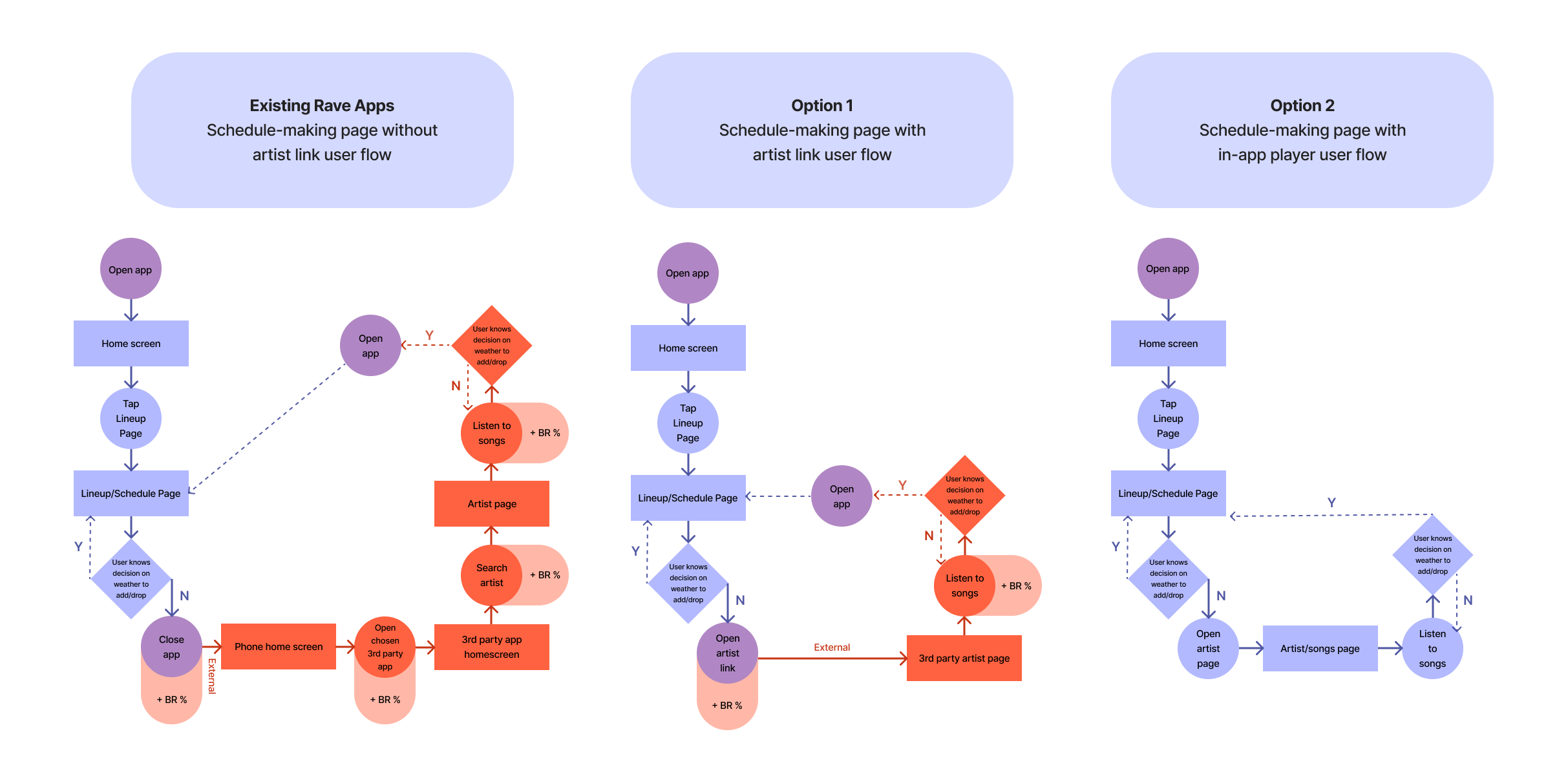
User Flow
OLD-OPTIONS
Hey there, this is the default text for a new paragraph. Feel free to edit this paragraph by clicking on the yellow edit icon. After you are done just click on the yellow checkmark button on the top right. Have Fun!
Interested in working together? Get in touch!
Perspective